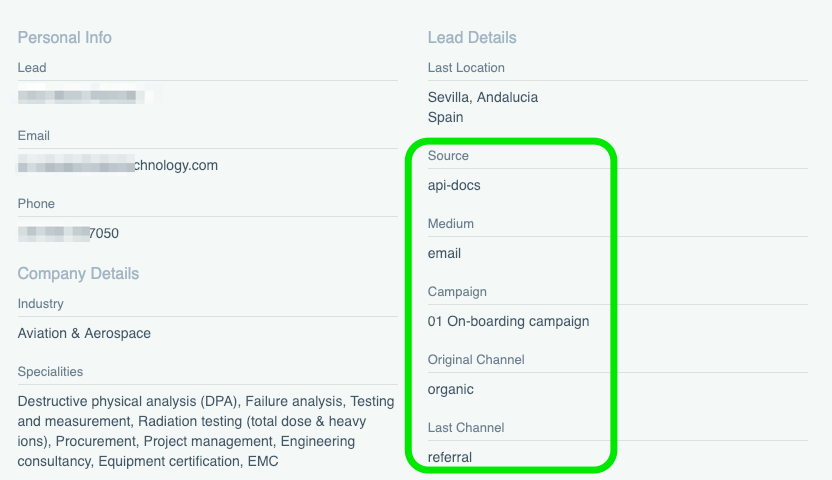
Working with cross-channel marketing, whereby you have multiple entry points to your landing pages, it’s a good idea to keep track of which sources or campaigns are generating traffic and which are converting on your content.
We now measure and display both the original (first) and last UTM tag that we have captured, making it easier to attribute a lead or sale to the original or last engagement that we tracked.
A core part of our platform is of course the tracking pixel that captures the interactions and engagement of website visitors.
Therefore we are happy to announce that we have completely rewritten the code that produces this javascript. The new code contains some state-of-the-art features such as:
can be loaded async
ability to set custom user ID’s
ability to lookup email or user ID’s to realise cross-browser unification of users
ability to track cross domains
and multiple features we will be releasing in the near future
We have updated the lead pixel (tracking javascript) so that you can now set the user-ID through url value. This is usefull if you would like to create a closed system in where you want to make sure that all events (even on different devices or platforms are grouped under one single profile)
In short If the lb_uid parameter is set in a landing url, we are updating cookie to use its value as user_id.
We now categorise each new lead and customer into channel groupings, meaning you can see how see how each lead or customer originally arrived or was referred to your site (Original Channel), and in their last session/visit (last Channel).
Channel groups are defined with the following rules:
Direct: utm_source = ‘direct’ or utm_medium = unknown
Other: everything else
In our next Sprint we will add these to the filter options so you can create segments/filters based on channel.
Send test email notifications
One functionality our customers asked for was the ability to test the emails that will be sent out automatically on a daily or weekly basis. This can now be accomplished from the smartlist / segment edit window.
Other Updates
We have configured the Daily / Weekly notifications to continue as per usual after a trial has expired, however the data is limited to 3 results.
Added another node to our script serving cloud, to improve response times on the US East Coast
Mapped additional Form properties to specific LeadBoxer values
This Month we added the option to receive your daily or weekly segmented leads or customers in a new file-format: PDF
These PDFs contain the full details of one person or company. By default we will send the top 10 leads or customers that are within your created segment and period.
Improved Dutch Chamber of Commerce (KvK) Matching
We now match significantly more dutch companies to their entries in the dutch chamber of commerce.
We now match both LinkedIn and Chamber of commerce data also on manually added companies. This works for both changing the company name in the User interface or for company data that is captured through forms and email tracking.
Lead pixel (tracking script) improvements
We are now geo load-balancing the serving of our tracing script from 4 locations worldwide, making sure we offer the fastest load-times possible.
New Native integration
We have developed a native integration with a Dutch Lead Management System called LEF, which is designed for the automotive industry.
Other fixes / updates
New Lead-details email design, we have spend some time to make the shared and assigned leads look good in most mail clients.
We fixed broken links on the Smart-list overview.
Improved behaviour of filters and smart-list saving. Editing existing smart-list should now be less confusing.
We’re happy to announce that today we have implemented the next step in our evolution from a lead generation solution towards what we call a Lead & Customer Data Platform. Read more about CDP’s here: Customer Data Platforms
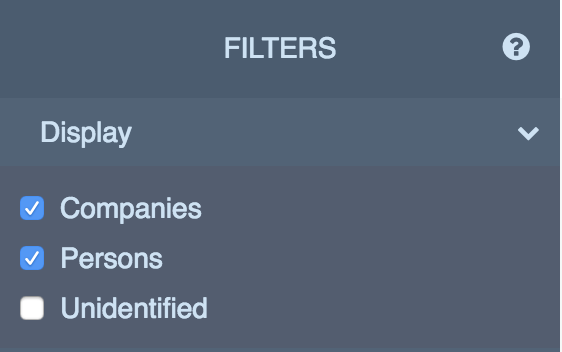
As of now, we have introduced a new filter called Display. This filter allows you to easily segment (filter on or hide) Companies, Persons and Unidentified leads.
Important change: By default we now are no longer showing the Unidentified Visitors when you login. If you want to see the Unidentified, you need to enable this via the Display filter
Next steps / vision
As many of you know, most purchasing decisions in the B2B world are made by a decision making or Demand Unit. Our vision is to enable our customers to get detailed insights into these units and provide ways to score, filter, and segment these units so that Sales and Marketing teams can get the insights needed to close these deals.
This is the first step towards this vision. Following steps include: a) Automatically group multiple persons to one company and b) Create an overall Company leadscore
All existing smartlists (segments) have been updated to reflect this new filter, please let us know if anything seems incorrect or illogical.
Additional updates
We added the utm_term value in the lead details
We included the option to ‘add comment’ when assigning a lead