Release Notes

LeadBoxer Product Changes

The most recent updates to the LeadBoxer product.

August 29, 2017

August product updates

Whats New with LeadBoxer?

Smartlist Overview

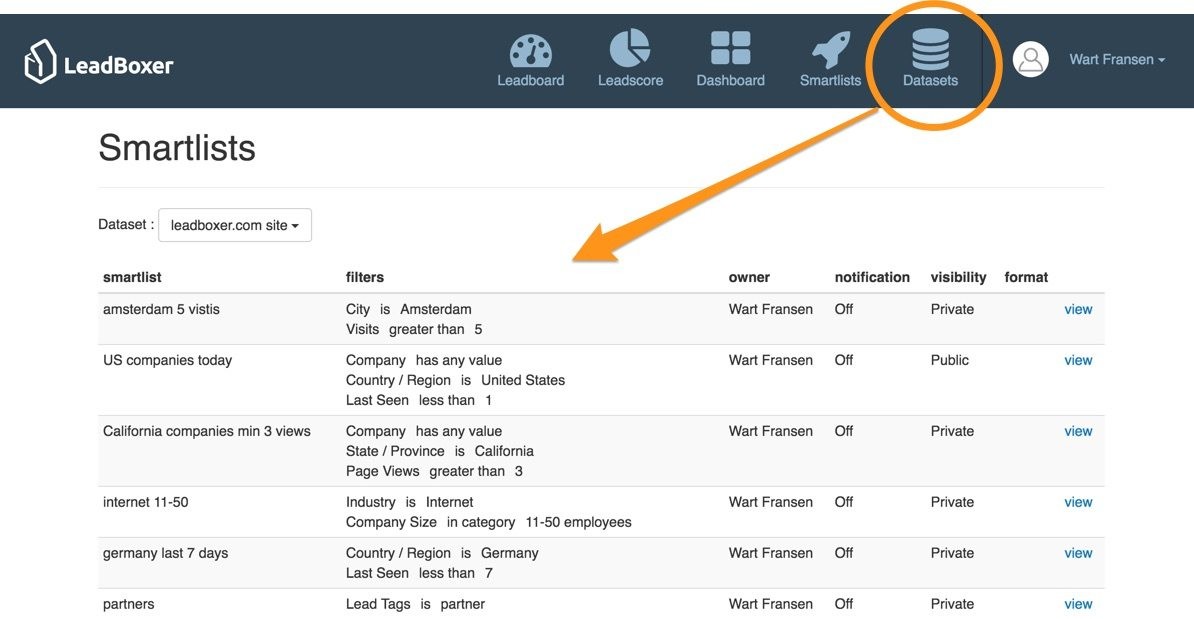
The biggest change we are introducing this month is the Smartlist Overview page. We created a new page that contains an overview of all the Smartlist & Notification per dataset; allowing you to see all the smart lists in your account.


Leadlist Custom Column

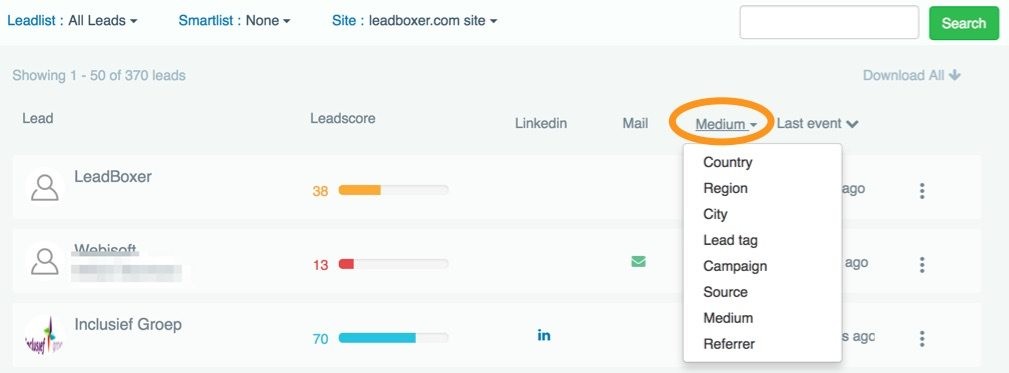
You can now set a column on the leadboard with a (sticky) metric of your choice. We are hoping that this new feature will allow users to have better overview of the factors which are important to them.

Set Target Job Title/Role 

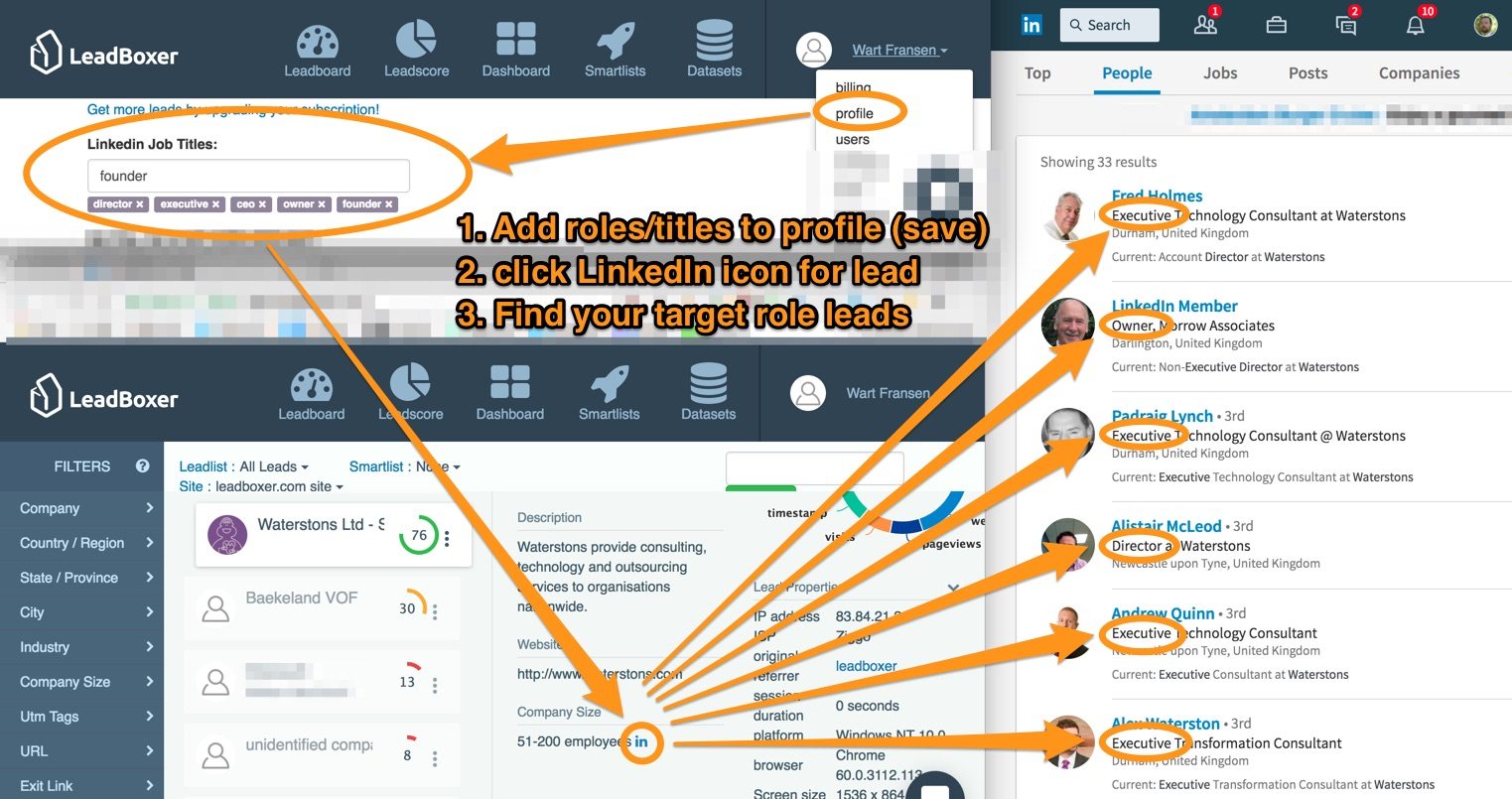
Users can now set target job titles, allowing for more streamlined way of finding individuals through the use of role / title search on LinkedIn

Negative URL filters – Now you can filter out leads that visited certain pages, eg job pages

Search as URL Parameter – You can now link to LeadBoxer with a pre-defined search and dataset by specifying them in the URL.

New Filters: Referrer and Exit Link URL – Quickly find the leads that used a specific url/link to enter or exit your site.

‘Day of week’ for weekly smartlis notification: When setting your smartlist notification to weekly, you can now also select the day it is being send.

Other New Features and Improvements

Here you can see all the other smaller bugfixes and quality-of-life improvements that we did for LeadBoxer in the last month.

  • Invoices are now available for admins on the billing page
  • Allow for deep link to the individual lead-card in the UI
  • We made the payment page only visible for admins
  • We have added search keywords to lead details
  • You can now set a date/period on the dashboard
  • Hide datasets icon from top navigation bar for non-admins
  • Added total session duration to lead card properties
  • Renamed property filters to just Filters and added link to filter documentation
  • Made the Company filter also check column ‘company’
  • Added new API ‘/api/management/add_lead_tags’ for adding tags to leads instead of replacing them
  • Selecting a smart list will now show and expand the filters used

Thank you for sticking until the end of yet another LeadBoxer update.

July 25, 2017

New Lead Card & Redesigned Email Notifications

New LeadCard

Good news! We have completely renewed the lead card page, meaning that sharing a lead is now a much better experience. A lead card is a (responsive) webpage that shows all details for any of your website visitors. It contains all the company and personal data, the leadscore graph, all the other lead properties and the complete clickstream /behaviour of the last 5 visits.
For more details on the lead card see here: Lead card: Complete lead details in one page

Smartlist notifications as emails

We added the option to send smartlist notification as HTML emails as opposed to CSV. This makes it easy to look at the leads from the smartlist without opening your spreadsheet application.

Improved (good looking) HTML Email notifications

We also have completely rebuild the HTML emails we are now sending for both daily weekly updates as well for the smartlists that are send as HTML emails. The new email is fully responsive and contains a direct link to the new leadcard (see above)

Other new features and improvements

  • We added a link to reset password in profile page
  • We added a new page with all your invoices. The link to this page can be found on the payment page
  • We added te option to set or change the timezone for each of your datasets. This setting can be found on your profile page.
  • We now remember your latest ordering settings of leads (leadscore or last event) so when you come back its set to what you had before
  • We now also consider the order of leads while create and update smartlist
  • When you select a smartlist from the dropdown, we now expand and show the specific property settings for this smartlist
  • We made the share and assign buttons more prominently on the lead details section
June 15, 2017

New filters & auto capture URL parameters

We added 2 new features, some small improvements and a few bug fixes since our last update.

Filter on Email address, First and Last name

We added new filter to the property filter section that allows you select only the users or leads that have an email address, a first name or a last name, by selecting if these field have any values.

Remember, LeadBoxer does not automatically gather personal information so you need to add this by using one or many of our enrichment options.
Learn more on enrichment here

Auto capture URL parameters

Automatically enrich based on URL parameters

This update relates to the lead pixel. We now auto capture lead values from these url parameters:

  • email
  • firstName
  • lastName
  • companyName
  • phoneNumber
  • lb_id

This means that if your visitors views a page with the following URL:
http://www.website.com/?email=jane.doe@company.com&firstName=Jane&lastName=Doe&companyName=ABC&phoneNumber=123
We will automatically add these values (email, first name, lastname, etc) to the specific lead.

The lb_id parameter is special. Use this to add your own ID to a visitor so that you can match the visitor to another source. For example a client ID from a online purchase,  a custom build mailing tool or if you cannot use utm_ tags

You might not know, but we already captured utm_ tags, Learn more about UTM tags here

Other Improvements

  • In leadscore settings page, fixed Save/Reset button to bottom of the page
  • We now convert all all lead tags to lower case to prevent duplicate tags
  • We added a tooltip message for recipient user selection in smartlist save dialog


Bug fixes

  • The company and user icons and the leadscore graph are now rendered properly in Gmail while sharing leads
  • Resolved issue for custom CSV fields in daily/weekly smartlist notification mail
May 27, 2017

Auto-suggest for lead tags & UK chamber of commerce data

We have updated LeadBoxer with following improvements:

  • Updated the leadscore settings page so that now you can add multiple company sizes.
  • Added auto-suggest for lead tags. It will remember your previous choices and provide them to you in a dropdown.
  • Added the Option to choose the delimiter in download dialog. This makes it easy to open your downloads when your computer is set to an European language.
  • Added Website and UK chamber of commerce data in lead details
  • When custom data is available, we now automatically ‘open’ the lead properties
  • Enhancement in Save Smartlist Dialog
    • Logged in user will be selected by default
    • When you save a smartlist, and none of the users are selected, we now show relevant error message in dialog
  • Implemented a fall-back mechanism for Smartlist notifications: if a smartlist has no recipient, we send the notification to creator of the smartlist
May 12, 2017

Region filters and other improvements

New: We added region filters to the country & region section, allowing you to select whole regions like EMEA, Europe, AMER and APAC

Other Improvements & fixes

  • When you use the LinkedIn social login, we will now show the pictures of the person
  • When a ‘company’ value is provided by the customer, this will be show in place of the most likely company that LeadBoxer had identified.
  • All images are now loaded over secure (https) connections, making the app fully secured.
  • We changed the name of the CSV export when downloading, to include the name of the dataset.
  • We removed the ‘lists’ icon from the top navigation as this functionality can now be done using tags and filters
  • You can now export up to 2500 leads using the CSV download (up from 1000)
  • We replaced phone column on the full leadboard with country
  • The leadcard (when shared) has been redesigned to match the new look and feel
  • We fixed a bug that prevented saving smartlists in some specific cases.
April 27, 2017

CSV field configuration & exclude Lead Tags filter

We added one new feature this release:  the option to configure additional fields in you CSV download for both exporting as for the smartlist driven emails.

One big improvement: you can now filter out leads that have a specific Lead Tag using ‘is not’ and ‘does not contain’ options

Other improvements

  • We improved the unhide leads feature by automating the decision to unhide whole company or single lead
  • Seamless switching between version 1 and 2 of LeadBoxer
  • Added session time as a value in the API
April 14, 2017

Select additional fields for download CSV

Main improvement: Select additional fields for download CSV
You can now select which columns you want to add to the export / download. Both in the manual download as in the daily/weekly smartlist email notification.

Other improvements:

  • We added the option to include an custom message for smartlist daily/weekly email
  • The global search field in now included in the smartlist selection
  • The CSV file name now includes the name of the dataset (instead of the dataset ID)
  • Fixed a bug where smartest date selection did not go back further then 28 days
March 31, 2017

Filter by URL, Labels & Date-range selection

Filter by URL
We added the much requested feature: filter visitors by URLs. This is a very powerful new feature, enabling you to filter leads based on specific pages they have visited. For example: You would like to know which leads or prospects looked at the pricing pages? Now you can find that out with a few clicks!

Add tags to a lead, and filter on tags
A second major feature is the option to tag your leads from within the user interface. This can be used to add labels to your leads. for example: customer, competitor, partner, prospect, etc You can now also filter (include & exclude) these leads based on their tags with the Lead Tag filter. This is useful if you for example want remove all current customers from your selection, Simply add a filter to your smartest that excludes the tag that contains ‘customer’

Date range selection
We added the option to select a specific period to the ‘last seen’ filter. This useful if you want to investigate a campaign or date-range.

Other fixes and improvements

  • Lead tags UI enhancements including enter to save lead tags
  • Added Date to the timestamp – in clickstreams
  • Implemented a value based company size filter
  • We added an auto-suggest filter for industries based on the actual data
  • Implemented on boarding and LeadPixel install instruction if no pixel is installed
  • Renamed ‘Industry Focus’ filter to just ‘Industry’